
In the past two years, Man-in-the-Middle (MitM) or Adversary-in-the-Middle (AitM) phishing attacks have emerged as some of the most dangerous threats targeting small to mid-sized businesses in all industries. These attacks are particularly effective, exploiting user trust and bypassing traditional security measures—even Multi-Factor Authentication (MFA). In this article, we’ll explain how these attacks work and, most importantly, how to avoid them.
What is a MitM/AitM Phishing Attack?
These attacks aim to lure victims into providing their login credentials on a fake website that appears legitimate, often mimicking trusted services like Microsoft. The end goal is to steal the victim’s session token, allowing the attacker to bypass MFA and log into the account without needing the second authentication factor. Popular tools used by cybercriminals in these types of attacks include Evilginx and similar frameworks.
How the Attack Works
The typical attack process follows this pattern:
- Initial Phishing Email: You receive an email, often appearing to be from someone you know or from a legitimate company. The email will contain a link, usually pointing to a document, like a PDF or Word file. This type of phishing can affect both desktop and mobile users.

- Document Link Redirection: When you click on the link, it opens a document, often a PDF. Inside that PDF, there’s another link, claiming to lead you to the actual document.

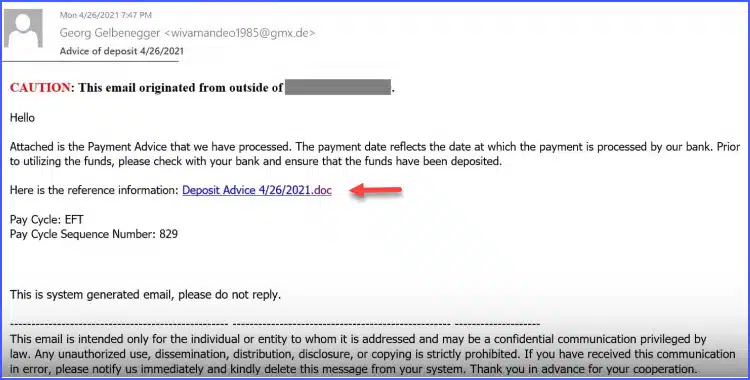

This is a Red Flag: If you ever encounter a PDF or document with a link that redirects you to another document or webpage, be wary. This “double link” tactic is a hallmark of phishing.
Beware of Fake Login Pages
Clicking the second link takes you to a login page that looks like Microsoft or another trusted service, but it’s a fake. One of the most effective ways to recognize this is by carefully examining the URL of the login page.
Instead of logging in via Microsoft’s usual URLs, like microsoft.com or office.com, you might be taken to a URL like mvmail365office.xyz or adhd-iceland.com. While the login page looks identical to Microsoft’s, these URLs are clear indicators that you’re on a phishing site.
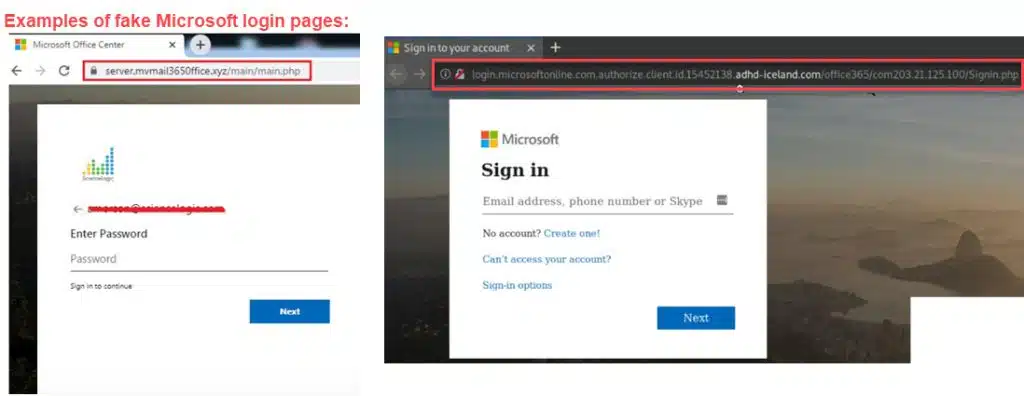
Credential Theft and Session Hijacking: If you enter your credentials on the fake login page, the attacker now has them. Even worse, once you log in, the attacker intercepts your session token—allowing them to bypass MFA and access your account as if they were you.
How to Recognize and Avoid These Phishing Scams
Despite the sophisticated tactics used in MitM/AitM phishing, there are clear signs you can watch for to avoid falling victim:
- Check URLs Carefully: Always scrutinize the URL of any login page, especially if you arrived there by clicking a link in an email or a document. Microsoft’s legitimate login pages only use a few domains: microsoft.com, office.com, and microsoftonline.com. Any deviation from these is a clear red flag.
- Avoid Clicking Links Inside Documents: Legitimate documents should not require you to click another link inside to access the actual content. If you open a document and it prompts you to click a second link to view a file, it’s highly likely to be a phishing attempt.
- Look for Multiple Redirections: Phishing attacks often involve multiple redirections. For example, you click a link in an email, which takes you to a document, and then that document links to a supposed login page. This chain of links should raise immediate suspicion.
- Be Wary of Unexpected Emails: Even if an email appears to come from someone you know, it’s a good practice to double-check with the sender before clicking on any links, especially if the email looks even slightly unusual or unexpected.
What Happens if You Fall for It?
If you enter your credentials on a phishing page, the attacker can immediately gain full access to your account. They can:
- Read and forward emails
- Send emails as you
- Access any sensitive data associated with your account
With a stolen session token, even MFA won’t protect you because the attacker is effectively “logged in” without needing the second factor.

Conclusion: Protect Yourself from MitM/AitM Phishing
MitM and AitM phishing attacks are dangerous because they exploit user trust and can bypass even the best security tools. The most effective defense is user vigilance. By learning to recognize the telltale signs of phishing, such as unfamiliar URLs and suspicious links within documents, you can stop these attacks in their tracks before any damage is done.
Remember, always check the URL. For example, Microsoft’s official URLS are microsoft.com, microsoftonline.com and office.com. If a URL looks different from any of those, it’s a phishing site.
Stay alert, double-check URLs, and when in doubt — don’t click. Following these best practices can prevent even the most sophisticated phishing attacks from compromising your data. Be safe out there everyone!
